
The bootloader and start keys
A bootloader is the small program that runs first when the iPod turns on and decides which firmware to start. Apple’s firmware is never changed or removed. A bootloader only sits in front of it.
With Rockbox’s bootloader (the usual way)
Section titled “With Rockbox’s bootloader (the usual way)”| Held at power-on | What starts |
|---|---|
| Nothing | Rockbox (or Scrollwheel OS, if you chose to start it by default) |
| Play | Scrollwheel OS (or Rockbox, after that swap) |
| Hold switch on, or Menu | Apple’s firmware |
The Scrollwheel bootloader (experimental)
Section titled “The Scrollwheel bootloader (experimental)”Our own bootloader starts Scrollwheel OS without needing Rockbox. It is offered only after you turn on App settings › Experimental › Offer the Scrollwheel bootloader (test). It has run on a real iPod mini 1st generation and nano 1st generation. On the nano, not every start key has been confirmed yet (see below).
In Firmware › Bootloader, pick Scrollwheel bootloader (no Rockbox needed), Rockbox bootloader or None (Apple only). Changing it asks you to type BOOT.
| Held at power-on | What starts |
|---|---|
| Nothing | Scrollwheel OS |
| Hold switch on, or Menu | Apple’s firmware, always, without even reading the disk |
| Play | Rockbox (if it’s installed) |
| Next (»|) | Scrollwheel OS in USB disk mode |
| Select, or Play/Next held for 1.5 s | The Start menu |
The Start menu lists Scrollwheel OS, Disk Mode, Rockbox (if installed), Apple Firmware and Apple Disk Mode. Turn the wheel to move and press Select to choose. Menu starts Apple’s firmware at once. Left alone for ten seconds, it starts Scrollwheel OS.
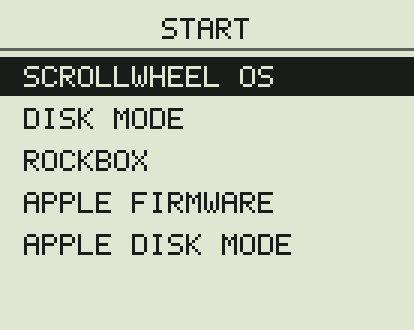
The Scrollwheel bootloader never writes to the iPod’s disk. If something is wrong, it shows a short message and starts Apple’s firmware instead. See Unexpected messages.
On the iPod nano (1st generation)
Section titled “On the iPod nano (1st generation)”The nano’s click wheel is slow to answer at power-on. Since bootloader 0.7.1, holding Play starts Rockbox on a real nano. Next and Select haven’t been confirmed on hardware yet. If the bootloader can’t hear the wheel, Scrollwheel OS reads the keys in its first second and restarts into your choice. Hold and Menu don’t depend on the wheel, so they always reach Apple’s firmware.
The way out that always works
Section titled “The way out that always works”Slide the Hold switch on before turning the iPod on. Both bootloaders then start Apple’s firmware. And Apple’s own disk mode can’t be blocked by any bootloader.